ACE Certification Preparation Guide: Section 3 — Ensuring successful operation of a cloud solution (~27% of the exam)
📚 Official exam guide: Associate Cloud Engineer certification — always confirm section weightings against the current Google Cloud exam guide.
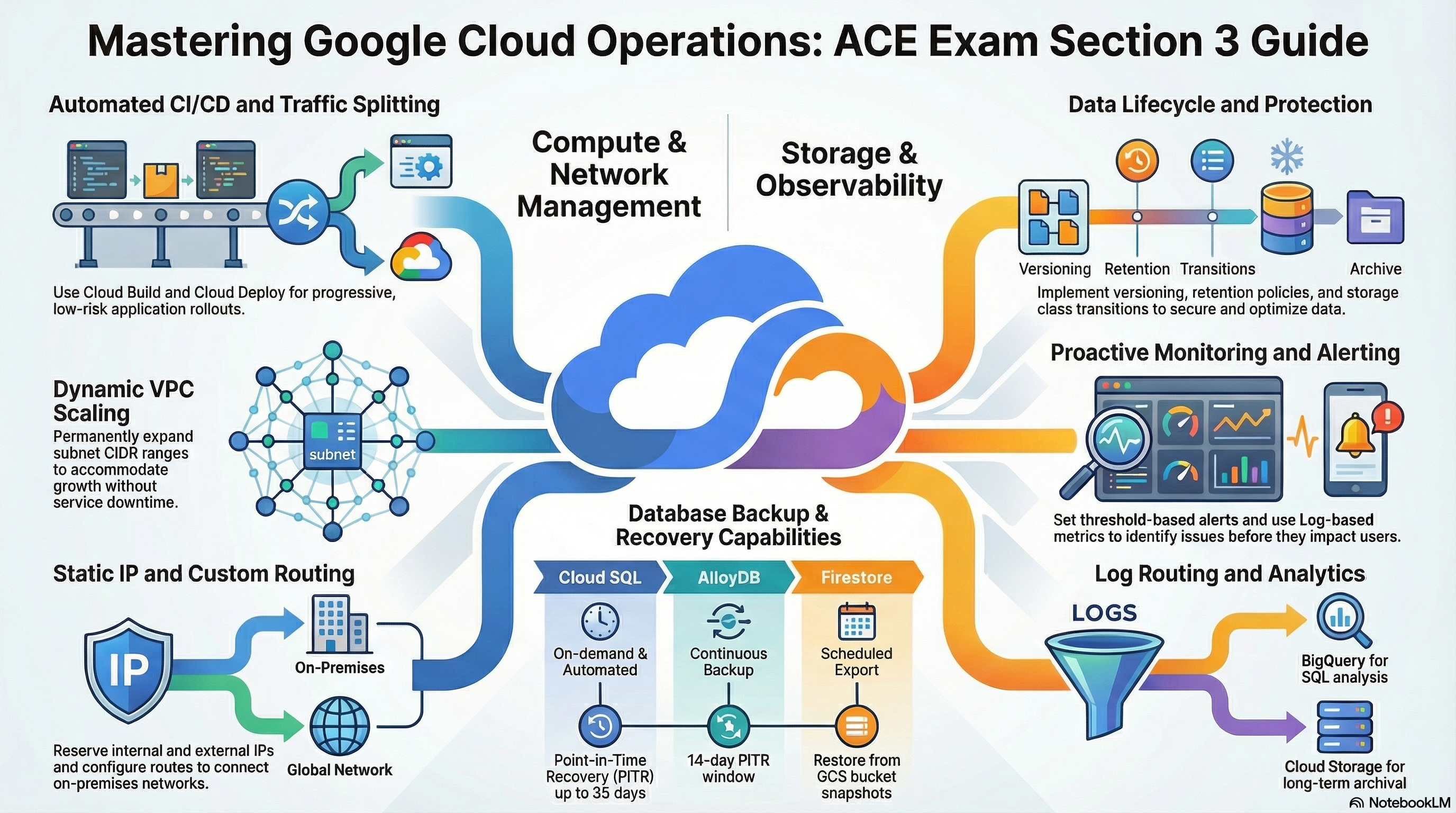
This guide covers exam Section 3 — day-2 operations — using the RAD platform foundation modules. App_CloudRun and App_GKE carry most of the load (revisions, traffic, CI/CD, backups, alerts); Services_GCP supplies the infrastructure alerts and audit logging. Deploy the Serverless application profile (plus the Kubernetes application profile for the kubectl labs and the Operations & security add-ons profile for 3.4) from the Lab Map.
3.1 Managing compute resources
⏱ ~90 min · 💰 low; Cloud Deploy stages each run their own service — destroy after the lab · ⚙️ Requires: Serverless application profile;
enable_cicd_trigger+ a GitHub repo for the CI/CD lab
Why the exam cares — Operating compute means deploying new versions safely (canary/blue-green via traffic splitting), scaling manually and automatically, and working a Kubernetes cluster from the CLI (kubectl get/describe/logs/scale). Expect questions on shifting Cloud Run traffic between revisions and on diagnosing pods.
How RAD implements it —
Revisions and traffic (Cloud Run): every portal update creates a new revision; max_revisions_to_retain (default 7) prunes older non-serving revisions. traffic_split (default [] = 100% to latest) takes a list of { type, revision, percent, tag } entries that must sum to exactly 100 (validated at plan time), e.g. 90% TRAFFIC_TARGET_ALLOCATION_TYPE_LATEST / 10% to a named revision — a declarative canary.
CI/CD: enable_cicd_trigger (default false) with github_repository_url and github_token creates a Cloud Build trigger (cicd_trigger_config.branch_pattern default "^main$") that builds with Kaniko, pushes to Artifact Registry, and either updates the service directly or — when enable_cloud_deploy = true — creates a Cloud Deploy release through cloud_deploy_stages (default dev → staging → prod, with require_approval = true on prod). Note that enable_cloud_deploy = true without enable_cicd_trigger = true is rejected at plan time — Cloud Deploy releases only come from the CI/CD pipeline.
Kubernetes operations (App_GKE): the HPA spans min_instance_count (default 1) to max_instance_count (default 3); enable_pod_disruption_budget (default true) creates a PDB with pdb_min_available (default "1", skipped when max_instance_count = 1); enable_resource_quota (default false) caps the namespace at quota_cpu_requests/quota_cpu_limits (default "4"), quota_memory_requests (default "4Gi") / quota_memory_limits (default "8Gi") — memory values must carry a binary suffix (Gi/Mi), enforced by a plan-time validation, because Kubernetes treats a bare "4" as 4 bytes and would block all scheduling. cron_jobs deploys Kubernetes CronJobs.
Compute Engine operations: the Services_GCP NFS VM runs in a MIG with auto-healing health checks and a daily snapshot schedule with 7-day retention — a live example of snapshot-based VM protection.
Try it
- Deploy a visible change (e.g. set an env var in
environment_variables), then split traffic in the portal:traffic_split = [{ type = "TRAFFIC_TARGET_ALLOCATION_TYPE_LATEST", percent = 90 }, { type = "TRAFFIC_TARGET_ALLOCATION_TYPE_REVISION", revision = "<service>-0000X", percent = 10, tag = "previous" }]. Verify, then practice the imperative equivalent the exam tests:gcloud run revisions list --service=<service-name> --region=us-central1
gcloud run services update-traffic <service-name> --region=us-central1 \
--to-revisions=<service>-0000X=10,LATEST=90
gcloud run services describe <service-name> --region=us-central1 --format="yaml(status.traffic)" - On GKE, exercise the core
kubectlloop:gcloud container clusters get-credentials gke-cluster-1 --region=us-central1
kubectl get pods -n <namespace> -o wide
kubectl describe pod <pod-name> -n <namespace>
kubectl logs <pod-name> -n <namespace> --tail=50
kubectl scale deployment <name> -n <namespace> --replicas=3 # HPA will reconcile this
kubectl get pdb,resourcequota -n <namespace> - With CI/CD enabled, push a commit to
mainand watch:gcloud builds list --limit=3, then Cloud Deploy > Delivery pipelines to promote dev → staging and approve prod (gcloud deploy rollouts approve ...is the CLI form). - You know it worked when
status.trafficshows your 90/10 split and the tagged revision serves on its own tag URL.
Check yourself
Q1: Five minutes after a release, error rates spike on the new Cloud Run revision. Fastest rollback?
A: gcloud run services update-traffic <service> --to-revisions=<previous-revision>=100. Revisions are immutable, so the previous one is still deployed and warm — shifting traffic is instant and requires no rebuild or redeploy. This is exactly what traffic_split declares in Terraform form.
Q2: You run kubectl scale deployment app --replicas=10 but pods drop back to 3. Why?
A: A HorizontalPodAutoscaler owns the replica count (the module creates one spanning min_instance_count–max_instance_count, default max 3). The HPA reconciles manual scaling back into its bounds; to scale higher you raise max_instance_count (or edit/remove the HPA), not the Deployment.
Q3: During cluster maintenance, why does at least one pod of the app always stay up?
A: enable_pod_disruption_budget (default true) creates a PDB with minAvailable: 1, so voluntary disruptions (node drains, upgrades) cannot evict the last available pod. Note it does not protect against involuntary failures like node crashes.
Beyond the modules — VM SSH workflows are not part of the app modules: practice gcloud compute ssh <vm> --tunnel-through-iap (the module's fw-allow-iap-ssh rule for 35.235.240.0/20 already permits this to the NFS VM), gcloud compute instances list --filter="status=RUNNING", on-demand snapshots (gcloud compute disks snapshot), creating images from disks, and MIG rolling updates (gcloud compute instance-groups managed rolling-action start-update). Also study GKE Standard node-pool resize/upgrade commands, which Autopilot hides.
⚠️ Exam trap — gcloud run deploy always sends 100% of traffic to the new revision unless the service was previously set to manual traffic control (--no-traffic / explicit splits). If a question says "deploy without serving traffic", the answer involves --no-traffic and tags, mirroring the traffic_split tag field here.
3.2 Managing storage and database solutions
⏱ ~60 min · 💰 negligible (backup bucket storage) · ⚙️ Requires: Serverless application profile with a database (
database_type≠NONE)
Why the exam cares — Day-2 data work: running and restoring backups, understanding PITR vs snapshot restore, lifecycle-managing objects, and connecting to databases to run queries. Scenario questions usually test whether you know which recovery mechanism fits an RPO, and how to keep storage costs down automatically.
How RAD implements it — App_CloudRun/App_GKE provision an automated logical-backup pipeline: a Cloud Scheduler job triggers a Cloud Run job that runs the backup export on backup_schedule (default "0 2 * * *" UTC), dumping the application database to a dedicated GCS backup bucket whose lifecycle rule deletes objects older than backup_retention_days (default 7). Restores are first-class: enable_backup_import (default false) with backup_source (gcs or gdrive), backup_file, and backup_format runs a one-time import job. enable_custom_sql_scripts (default false) executes .sql files from custom_sql_scripts_bucket/custom_sql_scripts_path in lexicographic order (a non-empty path is enforced at plan time), optionally as the root DB user.
Independently of these logical dumps, the Cloud SQL instance itself keeps 7 automated daily backups (04:00 UTC) with PITR enabled and 7-day transaction-log retention. Bucket hygiene is demonstrated by the platform's object-storage layer: per-bucket versioning_enabled, lifecycle_rules (age, newer-version count, storage-class transitions), soft-delete policy, and public_access_prevention (default enforced).
Try it
- Trigger a backup right now instead of waiting for the schedule:
gcloud scheduler jobs list --location=us-central1
gcloud scheduler jobs run <backup-job-name> --location=us-central1
gcloud run jobs executions list --region=us-central1 --limit=3
gcloud storage ls -l gs://<backup-bucket>/ - Inspect the managed-backup side:
gcloud sql backups list --instance=<instance-name>andgcloud sql instances describe <instance-name> --format="yaml(settings.backupConfiguration)"— notetransactionLogRetentionDays: 7. - Add a lifecycle transition to a bucket in the portal (
lifecycle_ruleswith an age-basedSetStorageClasstoNEARLINE), redeploy, and verify:gcloud storage buckets describe gs://<bucket> --format="yaml(lifecycle_config)". - Run a custom SQL script: upload
001_create_table.sqlto a bucket, setenable_custom_sql_scripts = truewith the bucket/path, redeploy, and read the job logs withgcloud run jobs executions describe <execution> --region=us-central1. - You know it worked when a fresh timestamped dump appears in the backup bucket and
gcloud sql backups listshows the 7 retained automatic backups.
Check yourself
Q1: An engineer dropped a table at 14:32. The last nightly dump is from 02:00. What's the lowest-data-loss recovery, and why is it available here?
A: Point-in-time recovery — restore (clone) the Cloud SQL instance to 14:31. PITR is enabled on the instance with 7-day transaction log retention, so any second in that window is recoverable; the 02:00 GCS dump would lose 12.5 hours of writes. The exam expects you to know PITR creates a new instance rather than rewinding the existing one.
Q2: How do you keep backup-bucket costs flat without any manual cleanup?
A: An object lifecycle rule that deletes objects older than N days — exactly what backup_retention_days configures on the backup bucket. Lifecycle management is evaluated daily by GCS itself; no jobs or cron needed on your side.
Beyond the modules — gcloud sql connect is worth practicing but won't work against these instances directly because they have no public IP — connect via the Cloud SQL Auth Proxy (cloud-sql-proxy <connection-name>) or Cloud SQL Studio in the console. Also study: on-demand backups (gcloud sql backups create --instance=...), cross-product backup surfaces (Firestore export/import to GCS, GKE Backup — note Services_GCP has enable_gke_backup, default false, schedule 0 3 * * *, 30-day retention), BigQuery job history (bq ls -j), and the Pricing Calculator for storage cost estimation.
⚠️ Exam trap — Object versioning and lifecycle deletion interact: deleting a versioned object creates a noncurrent version that still bills until a num_newer_versions/age rule purges it. "We enabled versioning and storage costs doubled" is a classic scenario.
3.3 Managing networking resources
⏱ ~40 min · 💰 a reserved-but-unattached static IP bills hourly — release after the lab · ⚙️ Requires: Kubernetes application profile (for
reserve_static_ip) or any Cloud Armor deployment
Why the exam cares — Operations on live networks: reserving static internal/external IPs, adding subnets or expanding ranges as workloads grow, and keeping firewall rules current. The exam favors gcloud compute addresses and subnet-expansion commands.
How RAD implements it — Two operational patterns are live:
- Static IPs:
App_GKE'sreserve_static_ip(defaulttrue) reserves a global static external IP for the Gateway/load balancer (static_ip_nameoptional override);App_CloudRunlikewise creates a global static IP when its load balancer is enabled, and theServices_GCPNFS VM holds a reserved internal address so the share's IP survives instance replacement. - Subnets per region: adding a region to
availability_regionsinServices_GCPcreates a new subnet, router, and NAT gateway in that region on the next apply without touching existing subnets.
Try it
- List reserved addresses and identify which are global vs regional, internal vs external:
gcloud compute addresses list
gcloud compute addresses describe <address-name> --global - In the portal, set
reserve_static_ip = falseon App_GKE and redeploy; observe the Gateway now uses an ephemeral IP that can change on recreation — then set it back totrue(production hygiene). - Practice the manual exam commands in your project:
gcloud compute addresses create lab-ip --region=us-central1
gcloud compute addresses delete lab-ip --region=us-central1 --quiet - You know it worked when
gcloud compute addresses listshows the module's global address with statusIN_USE(attached to a forwarding rule).
Check yourself
Q1: After a maintenance redeploy, customers report DNS no longer resolves to the application. The Gateway IP changed. What was misconfigured?
A: The load balancer was using an ephemeral IP (reserve_static_ip = false). Ephemeral external IPs can change whenever the fronting resource is recreated; production endpoints referenced by DNS must use a reserved static address — exactly why the module defaults to true.
Q2: A global external Application Load Balancer needs an IP. Regional or global reservation?
A: Global (gcloud compute addresses create NAME --global). Global LBs use a single anycast IP; regional addresses attach to regional resources (VMs, regional LB forwarding rules). Picking the wrong scope is a common wrong-answer option.
Beyond the modules — Not implemented: custom static routes, VPC peering management, Cloud DNS record operations, and subnet IP-range expansion (the module creates subnets but you should practice growing one): gcloud compute networks subnets expand-ip-range <subnet> --region=us-central1 --prefix-length=23 (expansion only — ranges can never shrink). Also review VPC network > Routes to understand system-generated routes vs custom routes with next hops.
⚠️ Exam trap — A reserved external static IP that is not attached to anything still incurs charges; releasing unused addresses is a standard cost-cleanup answer (and an Active Assist recommendation).
3.4 Monitoring and logging
⏱ ~75 min · 💰 audit logging increases Cloud Logging volume/cost · ⚙️ Requires:
support_usersset;configure_email_notification = true+notification_alert_emailson Services_GCP;enable_audit_logging = truefor the audit lab
Why the exam cares — You must read and filter logs in Logs Explorer, create alert policies on metrics, understand notification channels, know which audit logs exist by default (Admin Activity: always on; Data Access: opt-in), and diagnose workloads from their telemetry.
How RAD implements it —
Metrics and alerts: setting support_users creates email notification channels plus built-in alert policies — for Cloud Run, CPU utilization > 90% and memory utilization > 90% (P99 over 60s windows, via the platform's monitoring layer); alert_policies (default []) adds custom threshold policies on any metric type, auto-filtered to your service. Services_GCP adds infrastructure alerts when configure_email_notification = true with notification_alert_emails: Cloud SQL CPU/memory/disk against alert_cpu_threshold/alert_memory_threshold/alert_disk_threshold (all default 80), and NFS VM CPU/memory/instance-down policies — the NFS memory alert reads the Ops Agent metric agent.googleapis.com/memory/percent_used. A Cloud Monitoring dashboard is created per application.
Probes: startup_probe_config and health_check_config define HTTP/TCP startup and liveness probes on both platforms — Kubernetes-style health checking you can see in the revision/pod spec.
Logging: GKE clusters ship SYSTEM_COMPONENTS and WORKLOADS logs and enable Managed Prometheus. enable_audit_logging (default false) turns on allServices ADMIN_READ/DATA_READ/DATA_WRITE Data Access audit logs plus explicit Secret Manager and KMS configs.
Uptime checks: uptime_check_config (default { enabled = false, path = "/" } — you must set enabled = true; check_interval default "60s", timeout default "10s") creates a <service>-uptime-check — an HTTP GET probe from multiple global regions — plus a <service>-uptime-check-alert policy on monitoring.googleapis.com/uptime_check/check_passed that notifies the support_users channels (via the platform's monitoring layer). The check is only created when the endpoint is publicly reachable (e.g. a custom domain, the nip.io LB host, or the run.app URL with ingress_settings = "all"); internal-only deployments get none. The uptime_check_names output returns the created check's name.
Try it
- List what monitoring the modules created:
(Console: Monitoring > Alerting and Monitoring > Dashboards. If your service is publicly reachable, also open Monitoring > Uptime checks and find
gcloud beta monitoring channels list --format="table(displayName, labels.email_address)"
gcloud alpha monitoring policies list --format="table(displayName, enabled)"<service>-uptime-checkprobing from multiple regions.) - Read your application's logs with exam-style filters:
gcloud logging read 'resource.type="cloud_run_revision" AND severity>=ERROR' --limit=10
gcloud logging read 'resource.type="k8s_container" AND resource.labels.namespace_name="<namespace>"' --limit=10 - Enable
enable_audit_logging = true, redeploy, perform an action (read a secret value in the console), then find it:gcloud logging read 'logName:"cloudaudit.googleapis.com%2Fdata_access" AND protoPayload.serviceName="secretmanager.googleapis.com"' --limit=5 - Break a probe on purpose: set
health_check_config.pathto/broken, redeploy, and watch the revision fail to become ready (Cloud Run) or the pod restart-loop (kubectl describe podshows failing liveness probes). Revert. - You know it worked when the policies list shows the CPU/memory alerts and step 3 returns a Data Access entry naming your principal.
Check yourself
Q1: Security asks "who read the database password last Tuesday?" — can you answer with default settings?
A: No. Secret reads are Data Access (DATA_READ) audit events, which are disabled by default; only Admin Activity (e.g. changing IAM, creating secrets) is always on. With enable_audit_logging = true the module enables Data Access logs for Secret Manager (and all services), making the question answerable from Logs Explorer.
Q2: An alert policy exists and its condition fires, but nobody is emailed. First thing to check?
A: Notification channels — a policy with no (or unverified) channels evaluates conditions but notifies no one. In RAD terms: support_users/notification_alert_emails must be non-empty, which is what creates and attaches the email channels.
Q3: A GKE pod is in CrashLoopBackOff. Give the two-command diagnosis sequence.
A: kubectl describe pod <pod> -n <ns> (events: image pull errors, OOMKilled, failing probes) then kubectl logs <pod> -n <ns> --previous (output of the crashed container, not the current restart). The --previous flag is the detail the exam likes.
Beyond the modules — Not implemented: log sinks/Log Router exports (to BigQuery, GCS, Pub/Sub), log-based metrics, log bucket retention configuration, Cloud Trace/Profiler, and Ops Agent installation (the module assumes it on the NFS VM for the memory metric). Practice: create a log-based counter metric from a Logs Explorer query and create a sink with gcloud logging sinks create. Know the _Required sink (Admin Activity, 400-day retention, cannot be disabled) vs _Default (30-day retention).
⚠️ Exam trap — Admin Activity audit logs are free and always on; Data Access audit logs are opt-in, billable, and high-volume (BigQuery is the one service with Data Access enabled by default). Mixing these up is the most common Section 3.4 error.
Need RAD to do something it does not do yet? Request it on the roadmap, or vote on what is already there.