PCDE Certification Preparation Guide: Section 3 — Migrate data solutions (~23% of the exam)
📚 Official exam guide: Professional Cloud Database Engineer certification — always confirm section weightings against the current Google Cloud exam guide.
This guide covers Section 3 of the Professional Cloud Database Engineer (PCDE) exam. Be warned up front: this is the section where the RAD foundation modules cover the least ground. The modules implement the export/import (extended-outage) migration path end to end — App_CloudRun/App_GKE backup-import jobs fed from GCS or Google Drive, driven by the App_Common scripts — and read replication inside Google Cloud via Services_GCP. Database Migration Service, Datastream, zero-downtime cutovers, and reverse replication are concept-only and carry heavy "Beyond the modules" study lists. Deploy the relational-baseline and app-dataops profiles from the PCDE Lab Map before starting.
3.1 Design and implement data migration and replication
⏱ ~90 min (half hands-on, half reading) · 💰 low — one import job + GCS staging · ⚙️ Requires: app-dataops profile with
enable_backup_import = true
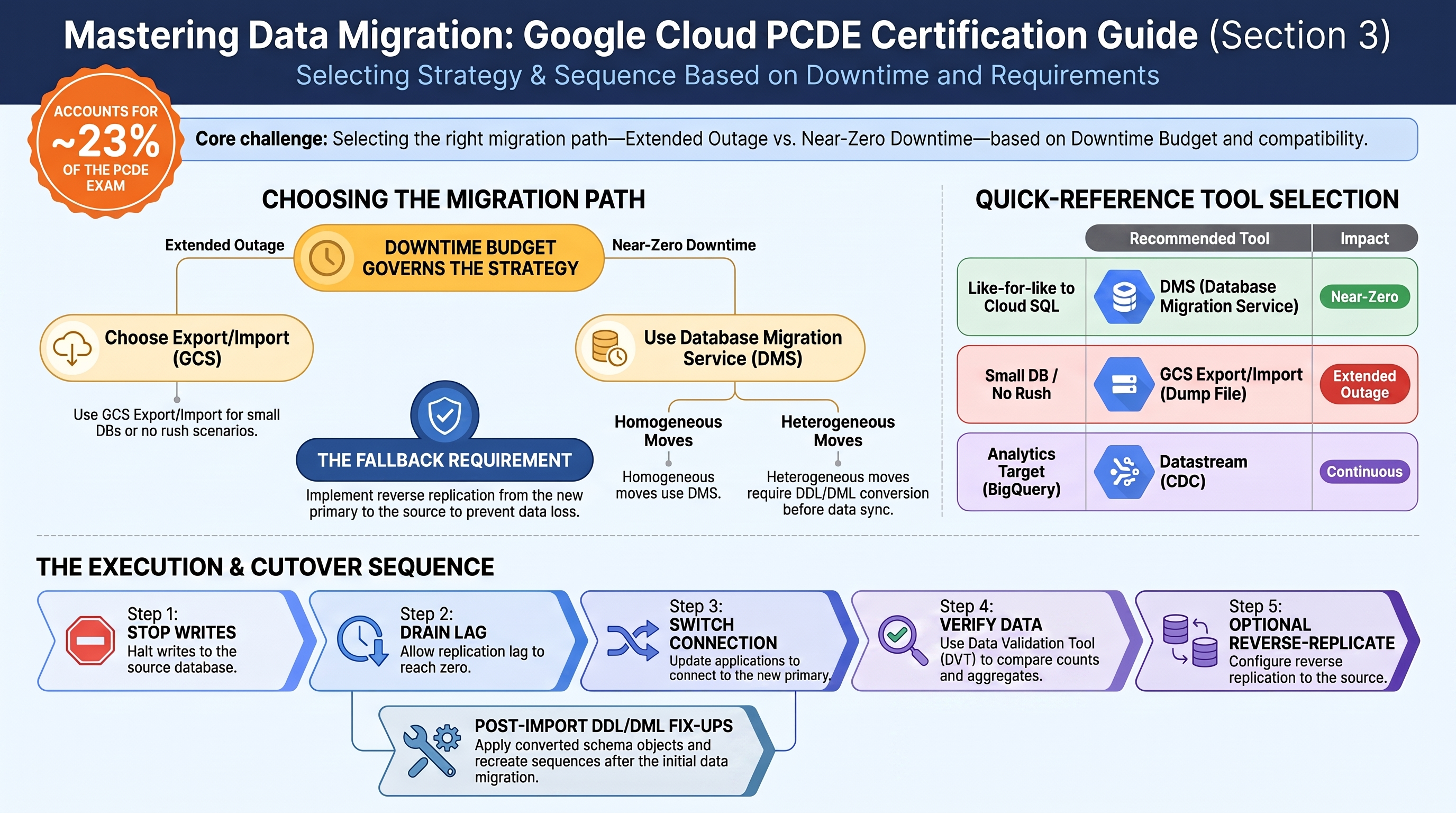
Why the exam cares — Migration questions are downtime-budget questions. The decision tree the exam tests: extended outage acceptable → one-time export/import (dump file through GCS); near-zero downtime → continuous replication (Database Migration Service for homogeneous moves into Cloud SQL/AlloyDB, Datastream/CDC for heterogeneous) with a short cutover; fallback required → reverse replication from the new primary back to the source so you can return if the cutover fails. Heterogeneous moves add DDL/DML conversion (schema/type/dialect translation) on top. You must pick the tool and sequence the cutover: stop writes → drain replication lag → switch connection strings → verify → (optionally) reverse-replicate.
How RAD implements it — the extended-outage path is real and runnable:
| Step of a lift-and-shift | Module implementation |
|---|---|
| Export from source | the export script (App_Common) — version-matched pg_dump/mysqldump producing backup-<timestamp>.tar.gz; for an external source you run the equivalent dump yourself |
| Stage the artifact | The module-provisioned GCS backup bucket (lifecycle-managed by backup_retention_days, default 7), or Google Drive |
| Import into Cloud SQL | enable_backup_import = true (default false) runs a one-time <service>-backup-import job selected by backup_source (gcs/gdrive, default gcs), restoring backup_file (default backup.sql) with backup_format (sql,tar,gz,tgz,tar.gz,zip,auto) through the Cloud SQL connector volume |
| Post-import fix-ups (DDL/DML adjustments) | enable_custom_sql_scripts + custom_sql_scripts_bucket/custom_sql_scripts_path (+ custom_sql_scripts_use_root for privileged DDL) runs .sql files in lexicographic order — the place to apply converted schema objects, recreate sequences, or fix collations |
| Replication (inside GCP) | create_postgres_read_replica / create_mysql_read_replica in Services_GCP — Cloud SQL native async replication, the same mechanism a DMS migration uses for its destination sync, observable end to end |
What the modules deliberately do not do: connect to an external source, run change data capture, or orchestrate a cutover. There is no DMS, Datastream, or external-server replication configuration anywhere in the four modules.
Try it
-
Simulate a source database: connect to the lab instance (Auth Proxy + psql as in Section 1.3), create a table with rows, and dump it — or simply let the scheduled export from Section 2.5 produce one. Stage your own file explicitly:
pg_dump -h 127.0.0.1 -U postgres -d postgres -f /tmp/source-dump.sql
gcloud storage cp /tmp/source-dump.sql gs://<backup-bucket>/source-dump.sql -
In the portal set
enable_backup_import = true,backup_source = "gcs",backup_file = "source-dump.sql",backup_format = "sql", and apply. Watch the import job:gcloud run jobs executions list --job=<service>-backup-import --region=us-central1
gcloud logging read 'resource.type="cloud_run_job" AND resource.labels.job_name="<service>-backup-import"' \
--limit=50 --freshness=1h -
Verify row counts match the source (the migration engineer's first validation):
psql -h 127.0.0.1 -U <app-user> -d <db> -c "SELECT count(*) FROM <your_table>;" -
For the replication half, apply ha-production (Section 1.2) and watch
cloudsql-<prefix>-postgres-replicaseed and catch up —gcloud sql instances describe cloudsql-<prefix>-postgres-replica --format="value(state, replicaConfiguration)". This is the same replica machinery DMS drives during a continuous migration. -
You know it worked when the import execution succeeds and the destination row counts equal the source's.
Check yourself
Q1: A 2 TB on-premises PostgreSQL 14 database must move to Cloud SQL with under 5 minutes of downtime. Is the platform's import-job pattern appropriate? What is?
A: No — a dump/restore of 2 TB takes hours, all of it downtime (the pattern is right only when an extended outage is acceptable). Use Database Migration Service: initial snapshot plus continuous CDC replication from the source, let lag drain while the source stays live, then a minutes-long cutover. DMS homogeneous migrations to Cloud SQL are free, which the exam likes to mention.
Q2: After cutover to Cloud SQL, the business demands a fallback path for two weeks. What is the mechanism, and what must remain true at the source?
A: Reverse replication: replicate changes from the new Cloud SQL primary back to the old source (DMS supports configuring the old source as a replica of the migrated instance for PostgreSQL/MySQL, or you maintain logical replication yourself), so the application can be repointed back without data loss. The source must remain schema-compatible and reachable, and no writes may go to it directly during the fallback window — otherwise the two diverge.
Q3: An Oracle-to-PostgreSQL migration stalls because of incompatible PL/SQL and data types. Which class of work is this, and which tools address it?
A: DDL/DML conversion — heterogeneous migrations need schema and code translation, not just data movement. Tools: DMS's Oracle-to-PostgreSQL conversion workspaces (Ora2Pg-based), manual rewrite of stored procedures, plus type-mapping decisions (NUMBER → numeric, DATE → timestamp). In this platform the converted DDL would be applied through the custom-SQL-scripts job; the conversion itself is always engineering work the exam expects you to schedule before data sync.
Beyond the modules — Most of Section 3 lives here; budget real study time:
- Database Migration Service (DMS): connection profiles, migration jobs, homogeneous (MySQL/PostgreSQL → Cloud SQL/AlloyDB, free) vs heterogeneous (Oracle/SQL Server → PostgreSQL, conversion workspaces). In a scratch project walk through
gcloud database-migration connection-profiles create postgresql ...andgcloud database-migration migration-jobs create ... --type=CONTINUOUS, even if only to the validation step — the verify phase (gcloud database-migration migration-jobs verify) is exam-favored. - Datastream for CDC into BigQuery/GCS when the target is analytics rather than a like-for-like database.
- Cloud SQL external server replication ("Replicating from an external server" docs): the pre-DMS pattern of making a Cloud SQL instance a replica of an external primary; promotion = cutover (
gcloud sql instances promote-replica). - Zero-downtime sequencing: dual-write pitfalls, draining lag before cutover, connection-string switching via Secret Manager (this platform's secret-driven
DB_HOST/host secrets show exactly where you would flip it). - Validation tooling: the open-source Data Validation Tool (DVT) for row/aggregate comparison between source and target.
⚠️ Exam trap — "Use the import job / gcloud sql import sql for the migration" is the trap answer whenever the scenario states a downtime budget in minutes. Conversely, "set up DMS" is the trap when the scenario says a weekend outage is fine and the database is small — one-time export/import is simpler, cheaper, and exactly what this platform automates.
Need RAD to do something it does not do yet? Request it on the roadmap, or vote on what is already there.