PCDE Certification Preparation Guide: Section 2 — Manage a solution that can span multiple database technologies (~25% of the exam)
📚 Official exam guide: Professional Cloud Database Engineer certification — always confirm section weightings against the current Google Cloud exam guide.
This guide covers Section 2 of the Professional Cloud Database Engineer (PCDE) exam: day-2 management — access control, monitoring, backup/recovery, cost/performance tuning, and task automation. It exercises all four foundation modules: Services_GCP (instances, IAM auth, alert policies), App_CloudRun and App_GKE (database users, export schedulers, rotation jobs), and the App_Common submodules and scripts that implement them. Deploy the relational-baseline and app-dataops profiles from the PCDE Lab Map before starting; 2.2 also benefits from the ha-production profile's notification settings.
2.1 Determine database connectivity and access management considerations
⏱ ~45 min · 💰 no additional cost · ⚙️ Requires: relational-baseline profile; set
enable_cloudsql_iam_auth = trueon Services_GCP
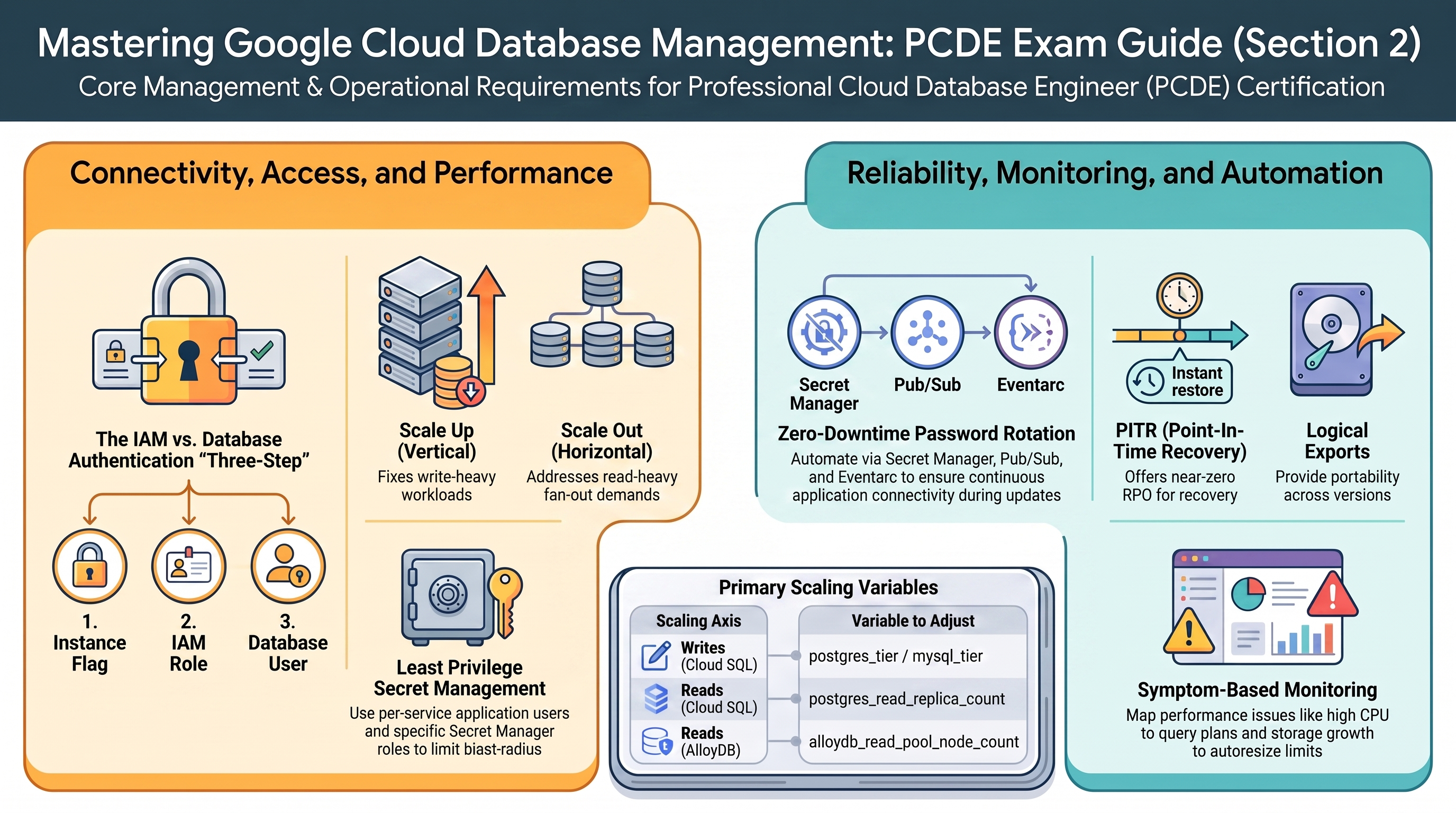
Why the exam cares — The exam separates two layers it loves to conflate in distractors: IAM controls who may reach and administer the instance (roles/cloudsql.client, roles/cloudsql.instanceUser, roles/cloudsql.admin), while database users control what happens inside the engine (GRANTs, ownership). IAM database authentication bridges them — short-lived OAuth tokens instead of passwords — and you must know its setup steps and limits.
How RAD implements it —
| Mechanism | Where | Detail |
|---|---|---|
| IAM database authentication | Services_GCP | enable_cloudsql_iam_auth (default false) adds the IAM-auth database flag to the PostgreSQL primary and replicas and the MySQL primary, and grants roles/cloudsql.instanceUser to the Cloud Run and Cloud Build service accounts |
| Built-in users | Services_GCP | Root password is a 16-char random password, plus an explicit database user resource (root@% for MySQL — the explicit resource is needed for the MySQL grant model), stored only in Secret Manager (secret-<instance>-root-password) |
| Application users | the db-init job in App_CloudRun / App_GKE | Creates a per-app database user idempotently, creates the database with that user as owner, and applies GRANT ALL PRIVILEGES ON DATABASE / GRANT ALL ON SCHEMA public (PostgreSQL) or CREATE USER '<user>'@'%' + grants (MySQL) |
| App credential | App_CloudRun/App_GKE database_password_length (default 32, validated 16–64) | Generated password stored as secret-<instance>-<service>; injected via secret references only |
| Secret access IAM | App_Common | Per-secret roles/secretmanager.secretAccessor to the runtime SA — least privilege, no project-wide secret access |
Note the engine nuance: the flag name differs per engine — PostgreSQL uses cloudsql.iam_authentication (dot) while MySQL uses cloudsql_iam_authentication (underscore), and the platform sets the underscore form for MySQL. A nice exam-trap nuance: the same feature, two different flag spellings.
Try it
-
Set
enable_cloudsql_iam_auth = truein the portal and apply. Verify the flag and grants:gcloud sql instances describe cloudsql-<prefix>-postgres \
--format="value(settings.databaseFlags)"
gcloud projects get-iam-policy <project> \
--flatten="bindings[].members" \
--filter="bindings.role:roles/cloudsql.instanceUser" \
--format="value(bindings.members)" -
Add an IAM database user (the flag alone does not create one — a deliberate two-step the exam tests):
gcloud sql users create cloudrun-sa-<prefix>@<project>.iam.gserviceaccount.com \
  --instance=cloudsql-<prefix>-postgres --type=cloud_iam_service_account
gcloud sql users list --instance=cloudsql-<prefix>-postgres \
--format="table(name, type)" -
In Console > SQL > <instance> > Users, observe the built-in
postgres/rootuser, the application user created by thedb-initjob, and your newCLOUD_IAM_SERVICE_ACCOUNTuser. -
You know it worked when
gcloud sql users listshows the IAM principal with typeCLOUD_IAM_SERVICE_ACCOUNTand the flags output containscloudsql.iam_authentication=on.
Check yourself
Q1: After enabling enable_cloudsql_iam_auth, a service account still cannot log in with an IAM token. The flag is on and roles/cloudsql.instanceUser is granted. What is missing?
A: The database user itself. IAM authentication requires three things: the instance flag, the IAM role, and a database user of type CLOUD_IAM_SERVICE_ACCOUNT (or CLOUD_IAM_USER) created on the instance — plus in-database GRANTs on the objects it needs. The module automates the first two; the user creation is the step candidates forget.
Q2: Why does the platform generate a separate 32-character application user per service instead of letting applications connect as root?
A: Least privilege and blast-radius control: the app user owns only its own database (the db-init job grants per-database privileges), its password is scoped to one secret with per-secret secretAccessor IAM, and it can be rotated (2.5) without touching other tenants. Root credentials in app code is a standard wrong-answer pattern on the exam.
Beyond the modules — IAM group authentication for Cloud SQL is not exercised here; read "IAM authentication" for both engines. Also study gcloud sql generate-login-token and the Auth Proxy --auto-iam-authn flag, which together replace passwords entirely.
⚠️ Exam trap — roles/cloudsql.client lets a principal connect through the proxy/connector; roles/cloudsql.instanceUser is what IAM login requires. Distractors swap them.
2.2 Configure database monitoring and troubleshooting options
⏱ ~45 min · 💰 negligible (alerting/log volume) · ⚙️ Requires: relational-baseline +
configure_email_notification = true,notification_alert_emailsset on Services_GCP
Why the exam cares — You are expected to map symptoms to signals: high CPU → query plans/missing indexes, high memory → working set/connection count, storage growth → autoresize headroom and log retention, lock waits → contention views (pg_stat_activity, INFORMATION_SCHEMA.INNODB_TRX), and to wire alerting before the incident. Questions also cover Query Insights and audit logs as diagnostic sources, and quota exhaustion (connections, storage) as a failure class.
How RAD implements it — Services_GCP creates three database alert policies, all filtered to resource.type = "cloudsql_database":
| Policy | Metric | Threshold variable (default) |
|---|---|---|
[prefix] Cloud SQL - High CPU Usage | cloudsql.googleapis.com/database/cpu/utilization | alert_cpu_threshold (80) |
[prefix] Cloud SQL - High Memory Usage | cloudsql.googleapis.com/database/memory/utilization | alert_memory_threshold (80) |
[prefix] Cloud SQL - High Disk Usage | cloudsql.googleapis.com/database/disk/utilization | alert_disk_threshold (80) |
Notifications fan out to email channels built from configure_email_notification (default false) + notification_alert_emails. The application modules add the workload side: alert_policies (a list of {name, metric_type, comparison, threshold_value, duration_seconds, aggregation_period} objects, default []) in App_CloudRun, plus a monitoring dashboard. uptime_check_config (default { enabled = false, path = "/" }) creates a <service>-uptime-check synthetic probe plus a failure alert policy, once enabled, whenever the application endpoint is publicly reachable — symptom-based monitoring of the database-backed service from outside. On the database itself, enable_query_insights (Services_GCP, default false) adds an insights_config block (query strings recorded up to 1024 chars) to both the PostgreSQL and MySQL primaries, lighting up Console > SQL > Query insights with per-query load and plans. For audit-trail troubleshooting, enable_audit_logging (Services_GCP, default false) records ADMIN_READ/DATA_READ/DATA_WRITE. Slow-query capture is available through the flag mechanism — the postgres_database_flags variable's own example shows log_min_duration_statement = 1000 — but no slow-query flag is set by default.
Try it
-
Enable email notification in the portal, apply, then confirm the policies exist:
gcloud alpha monitoring policies list \
--filter='displayName:"Cloud SQL"' --format="table(displayName, enabled)" -
Add a slow-query flag the way a DBA would, via
postgres_database_flags: append{ name = "log_min_duration_statement", value = "1000" }in the portal and apply (this restarts the instance). Then generate a slow query through psql (SELECT pg_sleep(2);) and read it back:gcloud logging read \
'resource.type="cloudsql_database" AND logName:"postgres.log" AND textPayload:"duration"' \
--limit=5 --freshness=1h -
In Console > SQL > <instance> > System insights, correlate CPU, memory, connections, and disk during your test load. Then set
enable_query_insights = true, apply, and open Query insights on the same instance to see per-query load and captured query text. -
You know it worked when the three alert policies list as enabled, your
pg_sleepstatement appears in the postgres log with its duration, and Query insights starts charting query load.
Check yourself
Q1: Users report intermittent application timeouts. Cloud SQL CPU is at 30%, memory at 50%, but active connections spike to exactly 200 during incidents. What is happening and what are two fixes demonstrated or discussed in this platform?
A: The instance is hitting the max_connections=200 flag default — a quota/limit problem, not a resource problem; new connections queue or fail. Fixes: raise the flag via postgres_database_flags after sizing memory for it, or reduce connection demand with pooling (Cloud SQL managed connection pooling / PgBouncer — a "Beyond the modules" topic from 1.3). Scaling CPU would not help, a classic distractor.
Q2: Which signal tells you an index is missing — and where would you look on a Cloud SQL instance?
A: Sustained high CPU and read IOPS with slow specific queries; confirm with Query Insights (per-query load, plans) or EXPLAIN ANALYZE showing sequential scans on large tables. In this lab you'd capture candidates via log_min_duration_statement, then EXPLAIN them in psql. The fix is CREATE INDEX, not a bigger tier — the exam rewards diagnosing before resizing.
Beyond the modules — Query Insights' advanced features (tagged query attribution via SQL commenter, longer retention) and the gcloud equivalent (gcloud sql instances patch <name> --insights-config-query-insights-enabled) are worth knowing alongside the module's enable_query_insights toggle. Locking diagnosis (pg_locks, pg_stat_activity.wait_event, MySQL SHOW ENGINE INNODB STATUS) and Cloud SQL quotas/limits (connections per tier, 64 TB storage cap) are pure-docs topics here.
⚠️ Exam trap — database/disk/utilization alerts at 80% can be a non-event on this platform because disk_autoresize = true grows the disk first — but autoresize cannot help when you hit the storage quota or when growth is caused by unpurged WAL/binlogs from a broken replica. Know the difference between "disk almost full" and "disk growing without bound."
2.3 Design database backup and recovery solutions
⏱ ~60 min · 💰 low — backup storage + a small GCS bucket · ⚙️ Requires: relational-baseline + app-dataops profiles
Why the exam cares — Backup questions are RTO/RPO arithmetic: automated daily backups give an RPO of up to 24 h; PITR (transaction logs) shrinks RPO to seconds within the log-retention window; exports (pg_dump/mysqldump) are portable but slow (long RTO) and are the only cross-version/cross-product option. Retention is both a compliance and a cost lever.
How RAD implements it — Three independent layers:
Managed backups + PITR (Services_GCP): the PostgreSQL primary is fixed to enabled automated backups with point-in-time recovery on, 7 days of transaction-log retention, 7 retained backups (count-based), a 04:00 start time, and the backup location set to the primary region. MySQL keeps 7 daily backups at 04:00 and enables binary logging — the binlog mechanism MySQL PITR relies on — but sets no PITR-specific attribute. AlloyDB gets a weekly automated backup (Sunday 04:00 UTC, a one-hour backup window, quantity-based retention of 7). Redis persistence is opt-in (redis_persistence_mode, default DISABLED; RDB with redis_rdb_snapshot_period default ONE_HOUR, or AOF — STANDARD_HA tier only), but enforced for production: a plan-time precondition rejects DISABLED persistence on a STANDARD_HA instance labeled environment = "production".
Logical exports (App_CloudRun, App_GKE): a db-clients job image (Debian 12 with postgresql-client-14–17 and the MySQL 8.0 client, built by App_Common) runs the export script, which picks a version-matched pg_dump/mysqldump and writes backup-<timestamp>.tar.gz to the dedicated GCS backup bucket. Scheduling is backup_schedule (default "0 2 * * *"); bucket retention is backup_retention_days (default 7) via an object lifecycle delete rule.
Imports / restore drills: enable_backup_import (default false) runs a one-time <service>-backup-import job restoring backup_file (default backup.sql, formats sql,tar,gz,tgz,tar.gz,zip,auto) from backup_source — gcs (the backup bucket) or gdrive.
Try it
-
List the automated backups Terraform configured, then take an on-demand one:
gcloud sql backups list --instance=cloudsql-<prefix>-postgres
gcloud sql backups create --instance=cloudsql-<prefix>-postgres \
--description="pre-change safety backup" -
Rehearse PITR the safe way — clone to a new instance at a timestamp (UTC, within the 7-day log window):
gcloud sql instances clone cloudsql-<prefix>-postgres pitr-drill-1 \
--point-in-time "2026-06-10T03:00:00Z" -
Trigger the logical export immediately instead of waiting for 02:00 UTC, then verify the artifact: Console > Cloud Storage > <backup bucket>.
gcloud scheduler jobs run <service>-backup-schedule --location=us-central1
gcloud storage ls gs://<backup-bucket>/ -
You know it worked when the clone instance reaches RUNNABLE with data as of your timestamp and a fresh
backup-<timestamp>.tar.gzobject exists in the bucket.
Check yourself
Q1: A developer dropped a table at 14:32. The platform's defaults are in place. What is your recovery path and your data loss?
A: Use PITR: clone the instance to a new instance at 14:31 (gcloud sql instances clone --point-in-time), then copy the table back or repoint the app. Data loss ≈ one minute (whatever you choose to discard), because transaction logs are retained 7 days. Restoring last night's 04:00 backup without PITR would lose ~10.5 hours — the distractor answer.
Q2: Compliance requires backups to survive a region-wide disaster. Does the module's configuration satisfy this, and what would you change?
A: Not fully: backup_configuration.location is set to the primary region, so managed backups live in that region (the GCS export bucket adds a second copy, but also regional by default). To survive region loss you would set a multi-region or different-region backup location, replicate the export bucket (dual/multi-region storage), and/or keep the cross-region read replica from 1.2. The exam expects you to notice backup location as part of DR design.
Q3: When is a pg_dump-based export the right recovery/migration tool instead of managed backups?
A: When you need portability: restoring into a different major version, a different product (AlloyDB, self-managed PG), another project/org, or keeping long-term archives independent of the instance's lifecycle (managed backups are deleted with the instance). The cost is RTO — logical restore is far slower than backup restore — and consistency is as-of dump start.
Beyond the modules — Cross-project backup restore, gcloud sql export sql (the serverless managed export to GCS, distinct from this module's job-based pg_dump), final backups on instance deletion, and Backup and DR Service for long-horizon retention are docs-only topics. Try gcloud sql export sql cloudsql-<prefix>-postgres gs://<bucket>/managed-export.sql --database=postgres in a scratch project and compare it with the job-based export.
⚠️ Exam trap — Backups ≠ PITR. Retained backups (7 here) bound how far back you can restore; transaction-log retention (7 days here) bounds how precisely. Also: restoring in place overwrites the instance — clone to a new instance for investigations.
2.4 Optimize database cost and performance
⏱ ~45 min · 💰 experiments scale cost up — revert when done · ⚙️ Requires: relational-baseline; ha-production and alloydb-ai for scale-out
Why the exam cares — "Scale up or scale out?" is the section's signature question: vertical scaling (bigger tier) fixes CPU/memory-bound write workloads but has a ceiling and a restart; horizontal read scaling (replicas/read pools) fixes read-heavy fan-out but does nothing for writes and introduces replication lag. Cost questions test right-sizing, committed-use thinking, and knowing which HA/replica choices double spend.
How RAD implements it — every scaling axis is one variable:
| Axis | Variable | Notes |
|---|---|---|
| Scale up (writes) | postgres_tier / mysql_tier / alloydb_cpu_count | In-place patch; brief restart |
| Scale out (reads), Cloud SQL | create_postgres_read_replica + postgres_read_replica_count (default 1) | Replica private IPs published as <replica-name>-host secrets so apps can route reads; replicas get a fixed max_connections=30000 flag |
| Scale out (reads), AlloyDB | enable_alloydb_read_pool + alloydb_read_pool_node_count (1–20) | One endpoint load-balanced across nodes — no per-replica routing needed |
| Engine tuning | postgres_database_flags / mysql_database_flags / alloydb_database_flags | Defaults: max_connections=200 (PG), max_connections=200 + local_infile=off (MySQL) |
| Cost floor | ZONAL default availability, BASIC default Redis tier, 10 GB autoresizing disk | The defaults are the cost-optimization lesson: HA, replicas, STANDARD_HA Redis, and CMEK are opt-in |
The Redis plan-time preconditions are a governance example: deployments labeled environment = "production" are blocked from BASIC tier at plan time, and a second precondition blocks redis_persistence_mode = "DISABLED" on a production STANDARD_HA instance — cheap-but-fragile configurations are disallowed exactly where an SLA exists.
Try it
-
With ha-production applied, raise read capacity without touching the primary:
# portal: postgres_read_replica_count = 2, then verify
gcloud sql instances list --filter="name:replica" \
--format="table(name, region, settings.tier, state)" -
Read the replica endpoint an application would use:
gcloud secrets versions access latest \
--secret=cloudsql-<prefix>-postgres-replica-host -
Measure replication health before trusting reads — in psql against the primary:
psql -h 127.0.0.1 -U postgres -d postgres \
-c "SELECT client_addr, state, replay_lag FROM pg_stat_replication;" -
You know it worked when both replicas show RUNNABLE and
pg_stat_replicationlists them with smallreplay_lag.
Check yourself
Q1: An e-commerce database is write-saturated during flash sales (CPU 95%, all from INSERT/UPDATE). The team proposes adding two read replicas. Why is that wrong, and what is right?
A: Replicas only serve reads — every write is still replayed on the primary and on each replica, so write saturation persists (and replicas may lag). The correct first move is vertical: a larger postgres_tier. If writes outgrow the largest tier, that is the exam's cue for re-architecture (sharding or Spanner), not more replicas.
Q2: What recurring cost do you take on per unit when you change postgres_read_replica_count from 1 to 3, and what operational cost comes with it?
A: Each replica bills like an instance of the primary's tier (postgres_tier is reused in the replica settings) plus its own storage — 3 replicas ≈ 3 extra primaries. Operationally, applications must consume the per-replica -host secrets and tolerate asynchronous lag; replicas are not free HA (they are ZONAL and must be promoted manually).
Beyond the modules — Query optimization itself (EXPLAIN plans, index design, Query Insights recommendations) has no module surface — practice on the lab instance with EXPLAIN (ANALYZE, BUFFERS). Continuous cost optimization tooling — committed use discounts for Cloud SQL, the Active Assist idle/overprovisioned instance recommenders, per-database billing labels in billing exports — is console/docs work: check Console > SQL > Recommendations in any long-lived project.
⚠️ Exam trap — Changing the tier restarts the instance (downtime ≈ seconds-to-minutes, or a failover on REGIONAL instances). "Resize during the maintenance window with HA enabled" beats "resize whenever" in scenario answers.
2.5 Automate common database tasks
⏱ ~60 min · 💰 low — jobs, scheduler, secret versions · ⚙️ Requires: app-dataops profile (
enable_auto_password_rotation = true)
Why the exam cares — The exam wants operations expressed as scheduled, auditable automation rather than humans with psql: scheduled exports, credential rotation, post-provision initialization, and SLO-based health monitoring. Knowing which GCP primitive schedules what (Cloud Scheduler → Cloud Run jobs; Kubernetes CronJobs; Secret Manager rotation topics → Eventarc) is the testable content.
How RAD implements it — four automations, all observable in the console:
- Scheduled exports. Cloud Run path: a Cloud Scheduler job (App_CloudRun) POSTs to the Cloud Run Jobs
:runAPI with the runtime SA's OAuth token, onbackup_schedule(default"0 2 * * *"), executing the<service>-db-exportjob. GKE path: a Kubernetes CronJob (App_GKE), name<service>-db-export, concurrency policyForbid, history limits 3/3, script delivered via ConfigMap. - Automated password rotation.
enable_auto_password_rotation(defaultfalse) wires Secret Manager'srotation_period(secret_rotation_period, default"2592000s"= 30 days) → Pub/Sub rotation topic → Eventarc trigger (<prefix>-pw-rot-trigger) → a dispatcher Cloud Run service (<prefix>-rot-dispatch) → the<prefix>-pw-rotatorjob (App_Common). The rotator: generates a new password, runsALTER USER, adds the new secret version, waits a propagation delay, then disables (not destroys) the old version — dual-version, zero-downtime, rollback-capable. - Initialization & schema tasks. The
db-initjob creates the database and user on every deploy (idempotent);enable_custom_sql_scripts+custom_sql_scripts_bucket/custom_sql_scripts_pathruns.sqlfiles from GCS in lexicographic order (optionally as root viacustom_sql_scripts_use_root); PostgreSQL extension and MySQL plugin install jobs install the configured extensions/plugins — note that in a standalone foundation-module deployment theenable_postgres_extensions/postgres_extensionsvariables are validation-only, with the actual lists injected by application wrapper modules. - SLO-adjacent monitoring.
alert_policiesprovides availability and latency alerting on the database-backed service, anduptime_check_configadds a<service>-uptime-checksynthetic probe plus failure alert for publicly reachable endpoints — external SLI data with no manual setup. - Scheduled maintenance.
sql_maintenance_window_day(1–7, Monday-based, default7= Sunday),sql_maintenance_window_hour(0–23 UTC, default3), andsql_maintenance_update_track("stable"/"canary"/"week5", default"stable") pin Cloud SQL maintenance to a predictable low-traffic window on both the PostgreSQL and MySQL primaries — patching becomes a declared, scheduled operation instead of Google-chosen timing.
Try it
-
Inspect the rotation plumbing after applying app-dataops: Console > Security > Secret Manager > secret-<instance>-<service> > Rotation, and:
gcloud scheduler jobs list --location=us-central1
gcloud run jobs list --region=us-central1 # <service>-db-export, <service>-db-init, <prefix>-pw-rotator -
Force a rotation rehearsal by executing the rotator job directly, then confirm the version flip:
gcloud run jobs execute <prefix>-pw-rotator --region=us-central1 --wait
gcloud secrets versions list secret-cloudsql-<prefix>-postgres-<service> \
--format="table(name, state)" -
Prove the app still authenticates: connect with the new latest version via psql (
PGPASSWORD=$(gcloud secrets versions access latest --secret=...) psql -h <db-ip> -U <app-user> -d <db> -c "SELECT 1;"). -
On GKE, run tomorrow's export now:
kubectl create job --from=cronjob/<service>-db-export manual-export -n <namespace>
kubectl logs -n <namespace> job/manual-export -f -
You know it worked when the secret shows a new ENABLED version with the prior one DISABLED, and the export job log ends with an upload to the backup bucket.
Check yourself
Q1: During rotation, why does the platform disable the old secret version only after a propagation delay instead of immediately destroying it?
A: Zero-downtime and rollback. Running instances may hold the old password in memory or fetch "latest" mid-rotation; the delay lets the new version propagate before "latest" becomes unambiguous, and disabling (rather than destroying) keeps the old version recoverable for rollback/audit. Destroying immediately risks authentication failures across the fleet — the exam's "what breaks" answer.
Q2: A team needs nightly logical backups of a GKE-hosted database with a guarantee that two exports never run concurrently. Which Kubernetes settings shown in this module deliver that?
A: A CronJob with schedule (the module's backup_schedule) and concurrencyPolicy: Forbid — exactly what the module's db-export CronJob sets — plus bounded history (successful/failedJobsHistoryLimit = 3) and restartPolicy: OnFailure with a backoff limit so a stuck export cannot pile up.
Beyond the modules — Two 2.5 topics have no implementation here: index maintenance (REINDEX/pg_repack, MySQL OPTIMIZE TABLE — you could schedule them through enable_custom_sql_scripts, but nothing ships) and managed upgrades — there is no automation for major version upgrades; study in-place upgrades (gcloud sql instances patch <name> --database-version=POSTGRES_18 once available, plus the pre-upgrade checks) and Cloud SQL maintenance/patching behavior. Formal SLOs (error budgets, gcloud monitoring SLO API) also live outside the modules.
⚠️ Exam trap — Secret Manager's rotation_period only publishes a Pub/Sub notification — nothing rotates unless something consumes it. This platform's Eventarc→dispatcher→job chain is that consumer; an answer that says "enable rotation on the secret and you're done" is wrong.
Need RAD to do something it does not do yet? Request it on the roadmap, or vote on what is already there.