PCDE Certification Preparation Guide: Section 1 — Design innovative, scalable, and highly available cloud database solutions (~32% of the exam)
📚 Official exam guide: Professional Cloud Database Engineer certification — always confirm section weightings against the current Google Cloud exam guide.
This guide covers Section 1 of the Professional Cloud Database Engineer (PCDE) exam — the largest section, weighted at roughly a third of the questions. It exercises Services_GCP (which provisions Cloud SQL PostgreSQL/MySQL, AlloyDB, Firestore Enterprise, and Memorystore Redis) with supporting connectivity patterns from App_CloudRun and App_GKE. Before starting, deploy the relational-baseline profile from the PCDE Lab Map; subsections 1.2 and 1.4 additionally use the ha-production, multi-engine, and alloydb-ai profiles.
1.1 Analyze relevant variables to perform database capacity and usage planning
⏱ ~45 min · 💰 no additional cost beyond the relational-baseline profile · ⚙️ Requires: default deployment (
create_postgres = true)
Why the exam cares — Capacity questions test whether you can translate workload metrics (connections, working-set size, IOPS, read/write ratio) into a machine tier and storage configuration, and whether you understand the cost consequences: vCPU/RAM drive instance cost linearly, SSD vs HDD trades IOPS for price, and over-provisioned storage cannot be shrunk. Expect scenarios like "the buffer cache hit ratio is low — add memory or add vCPUs?" where the right answer is the cheaper targeted change.
How RAD implements it — Sizing is fully parameterized in Services_GCP:
| Variable | Default | What it sizes |
|---|---|---|
postgres_tier / mysql_tier | db-custom-1-3840 | Cloud SQL machine: db-custom-<vCPUs>-<RAM MiB> — the default is 1 vCPU / 3.75 GB |
postgres_database_flags | [{ name = "max_connections", value = "200" }] | Connection capacity, tunable per workload |
alloydb_cpu_count | 2 (validated: 2, 4, 8, 16, 32, 64) | AlloyDB primary and read-pool node size |
redis_memory_size_gb | 1 (validated 1–300) | Memorystore working-set capacity |
Storage is deliberately not a variable: the PostgreSQL instance is fixed to a PD_SSD disk starting at 10 GB with disk autoresize enabled and no upper limit (unlimited), so the disk grows automatically as data arrives — a managed answer to "size storage for growth". The instance edition is fixed to Enterprise. The same shape applies to MySQL.
Try it
-
In your deployment portal, change
postgres_tierfromdb-custom-1-3840todb-custom-2-7680(2 vCPU / 7.5 GB) and apply. This is an in-placePATCHthat restarts the instance. -
Observe the change in Console > SQL > cloudsql-<prefix>-postgres > Edit > Machine configuration, then confirm from the CLI:
gcloud sql instances describe cloudsql-<prefix>-postgres \
--format="table(settings.tier, settings.dataDiskType, settings.dataDiskSizeGb, settings.storageAutoResize)" -
Check the connection ceiling the flag default gives you:
gcloud sql instances describe cloudsql-<prefix>-postgres \
--format="value(settings.databaseFlags)" -
You know it worked when the describe output shows the new tier and
storageAutoResize: TruewithPD_SSD.
Check yourself
Q1: A reporting workload on a db-custom-1-3840 instance shows 95% memory utilization and frequent disk reads, but CPU sits at 20%. Which single change in this module addresses it most cost-effectively?
A: Change postgres_tier to a custom shape with more RAM (e.g. db-custom-2-13312) rather than more vCPUs. Cloud SQL custom tiers let you scale memory to enlarge the buffer cache — which converts disk reads to cache hits — without paying for unused CPU. Adding storage or replicas would not fix a working-set-doesn't-fit-in-RAM problem.
Q2: Why does the module enable disk autoresize instead of provisioning a large disk up front, and what is the one-way street you must remember for the exam?
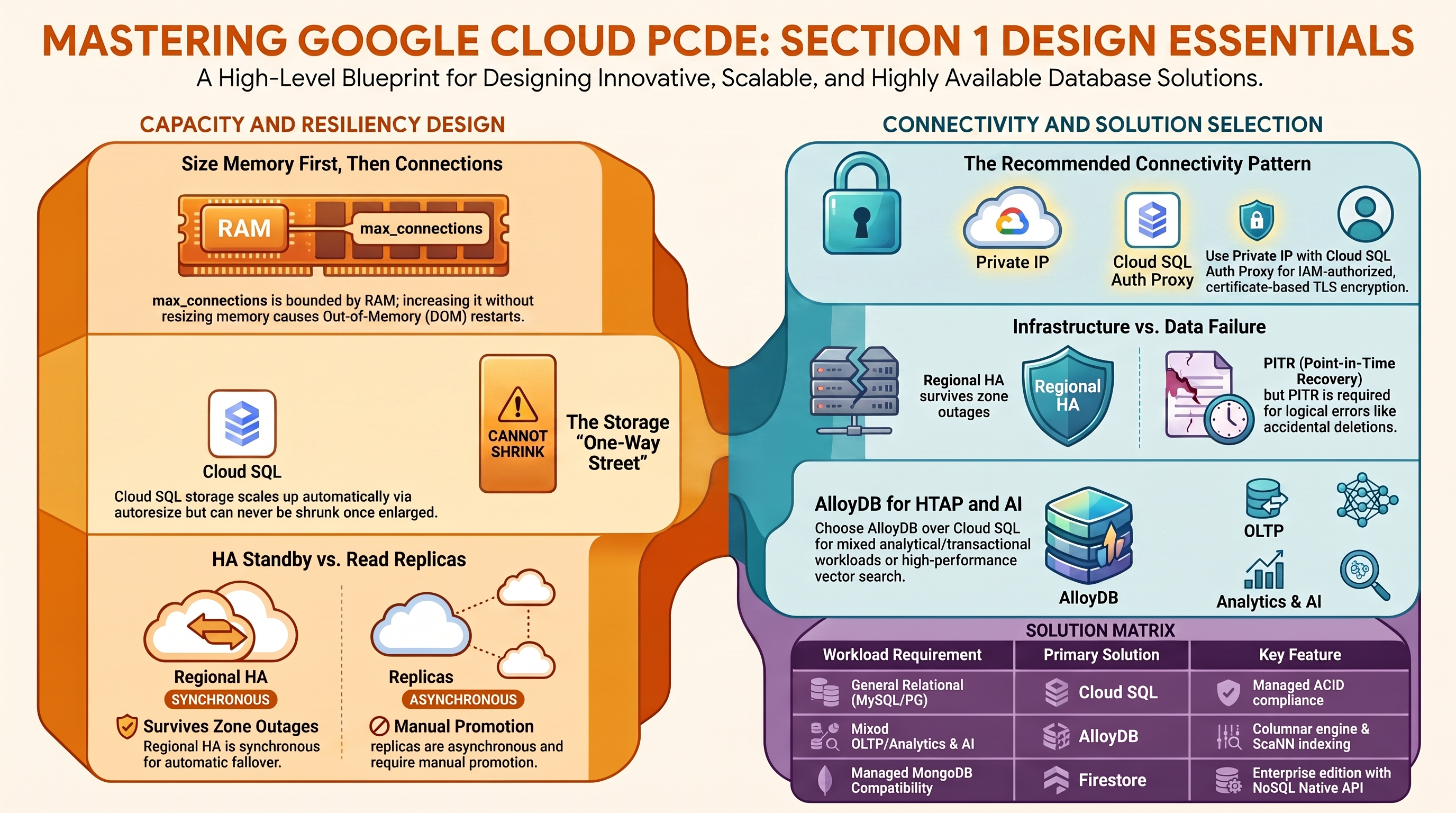
A: Autoresize means you pay only for storage actually used while never hitting a disk-full outage. The trap: Cloud SQL storage can grow but never shrink — once autoresize (or a manual edit) enlarges the disk, the only way back to a smaller disk is to export and import into a new instance.
Beyond the modules — The modules always use PD_SSD; the exam also tests when HDD storage is acceptable (rarely — archival/low-IOPS only) and how per-GB SSD pricing compares to instance pricing. They also fix the Cloud SQL edition to ENTERPRISE; study the Enterprise Plus edition (higher per-instance limits, data cache, near-zero-downtime maintenance) in the "Cloud SQL editions" docs page. Practice estimating with the official pricing calculator and gcloud sql tiers list.
⚠️ Exam trap — max_connections is bounded by instance memory: cranking the flag up without resizing the tier causes per-connection memory pressure and OOM restarts. Size memory first, then connections (or use a pooler — see 1.3).
1.2 Evaluate database high availability and disaster recovery options given the requirements
⏱ ~60 min · 💰 REGIONAL roughly doubles instance cost; each replica adds an instance-sized cost · ⚙️ Requires: ha-production profile
Why the exam cares — HA and DR questions hinge on matching the blast radius a requirement tolerates to the cheapest topology that survives it: zonal (no failover) → regional/HA (synchronous standby in a second zone, same region) → cross-region read replica (asynchronous, survives region loss but needs promotion). You must also know what each option does and does not protect: REGIONAL HA protects against zone failure, not against a bad DELETE — that is what PITR is for (see 2.3).
How RAD implements it — In Services_GCP:
| Variable | Default | Behavior |
|---|---|---|
postgres_database_availability_type | ZONAL | Set REGIONAL for an HA primary with an automatic-failover standby |
mysql_database_availability_type | ZONAL | Same choice for the MySQL instance |
create_postgres_read_replica / create_mysql_read_replica | false | Adds read replicas (instance type READ_REPLICA_INSTANCE) |
postgres_read_replica_count / mysql_read_replica_count | 1 | Replica fan-out |
availability_regions | ["us-central1"] | List ≥2 regions and replicas are placed in availability_regions[1] — a cross-region DR replica |
Replica placement follows the region list: when two or more regions are configured, replicas land in the second region; otherwise they stay in the primary region. Replicas are always ZONAL, and each replica's private IP is published to Secret Manager as cloudsql-<prefix>-postgres-replica-host so applications can split reads. Backups/PITR (the DR time machine) are hardcoded on the primary — see Section 2.3.
Maintenance windows are configured on the Cloud SQL instances: sql_maintenance_window_day (1–7, Monday-based, default 7 = Sunday), sql_maintenance_window_hour (0–23 UTC, default 3), and sql_maintenance_update_track ("stable"/"canary"/"week5", default "stable") configure the maintenance window on both the PostgreSQL and MySQL primaries. Memorystore Redis similarly pins maintenance to Sunday 02:00 UTC.
Try it
-
Apply the ha-production profile (
postgres_database_availability_type = "REGIONAL",create_postgres_read_replica = true,availability_regions = ["us-central1", "us-east1"]). -
In Console > SQL, the primary now shows "High availability (regional)" and a replica
cloudsql-<prefix>-postgres-replicaappears in us-east1. Verify topology:gcloud sql instances list \
--format="table(name, region, gceZone, settings.availabilityType, instanceType)" -
Trigger a manual failover (the exam expects you to know this command — it flips the primary to the standby zone):
gcloud sql instances failover cloudsql-<prefix>-postgres -
You know it worked when
gcloud sql instances describe cloudsql-<prefix>-postgres --format="value(gceZone)"reports a different zone than before the failover, and the replica still listsinstanceType: READ_REPLICA_INSTANCEin the secondary region.
Check yourself
Q1: A customer requires the database to survive a complete region outage with an RPO of minutes, but reads/writes during normal operation must stay in one region for latency. Which two module settings deliver this, and what manual step remains in a disaster?
A: postgres_database_availability_type = "REGIONAL" (zone-level HA with automatic failover) plus availability_regions = ["primary", "secondary"] with create_postgres_read_replica = true (asynchronous cross-region replica, RPO = replication lag, usually seconds-to-minutes). In a region loss you must still promote the replica (gcloud sql instances promote-replica) and repoint applications — cross-region failover is not automatic.
Q2: Why is enabling REGIONAL availability alone insufficient for a "we accidentally dropped a table" recovery requirement?
A: The HA standby is a synchronous copy — the DROP TABLE is replicated to it instantly. Logical/operator errors are recovered with point-in-time recovery (enabled in this module with 7 days of transaction logs) or backups, not with HA. HA addresses infrastructure failure; PITR addresses data failure.
Q3: Where would you configure when Cloud SQL applies maintenance, and what does this module do about it?
A: Via the instance's maintenance window (gcloud sql instances patch <name> --maintenance-window-day=SUN --maintenance-window-hour=2) and optional deny-maintenance periods. This module sets one declaratively — sql_maintenance_window_day/sql_maintenance_window_hour/sql_maintenance_update_track (defaults: Sunday, 03:00 UTC, stable) on both engines. For exam purposes know that HA instances get rolling maintenance on the standby first, and that maintenance notifications can be subscribed to per instance.
Beyond the modules — Deny-maintenance periods and maintenance notifications are not configured here (the window itself is — see above): practice gcloud sql instances patch --deny-maintenance-period-start-date/--deny-maintenance-period-end-date and the "About maintenance on Cloud SQL instances" docs page. Truly multi-regional write topologies (Spanner multi-region configurations, AlloyDB secondary clusters with switchover) are also out of scope for these modules — study "Spanner instance configurations" and "AlloyDB cross-region replication" docs.
⚠️ Exam trap — A read replica is not an HA standby. The REGIONAL standby is synchronous, invisible (no connection string), and fails over automatically; a replica is asynchronous, readable, and must be promoted manually. Questions that say "automatic failover" point to REGIONAL availability, never to replicas.
1.3 Determine how applications will connect to the database
⏱ ~60 min · 💰 no additional cost · ⚙️ Requires: relational-baseline profile (+ optionally
enable_cmek = true,enable_audit_logging = trueon Services_GCP)
Why the exam cares — Connectivity questions test the decision between private IP, public IP with authorized networks, and the Cloud SQL Auth Proxy/connectors; how encryption is enforced in transit (SSL modes) and at rest (Google-managed vs CMEK); where credentials live; and how access is audited. The Auth Proxy + private IP + Secret Manager combination demonstrated here is Google's recommended production pattern.
How RAD implements it — three layers:
Network path. The platform allocates a /16 internal range reserved for VPC peering and establishes a private services access (PSA) connection to the Service Networking service. Every database then attaches privately: PostgreSQL and MySQL disable the public IPv4 address and bind to the VPC's private network and allocated range; AlloyDB attaches to the same VPC; Redis uses the VPC as its authorized network with redis_connect_mode (default DIRECT_PEERING). There is no public IP on any database.
In-transit encryption. PostgreSQL enforces SSL mode ENCRYPTED_ONLY; MySQL is relaxed to ALLOW_UNENCRYPTED_AND_ENCRYPTED (a deliberate engine-by-engine difference worth noticing).
Application attach + credentials. In App_CloudRun, enable_cloudsql_volume (default true) mounts a Cloud SQL volume at cloudsql_volume_mount_path (default /cloudsql) — the managed Cloud Run Cloud SQL connector exposing a Unix socket per connection name. In App_GKE, the same flag injects a Cloud SQL Auth Proxy sidecar container running with --private-ip and the database port. Passwords are randomly generated and stored only in Secret Manager (e.g. secret-cloudsql-<prefix>-postgres-root-password); applications receive them via secret references, never plaintext. Key management: enable_cmek (default false) encrypts the instances with a customer-managed KMS key (rotation period cmek_key_rotation_period default 7776000s). Auditing: enable_audit_logging (default false) turns on ADMIN_READ/DATA_READ/DATA_WRITE audit logs for all services, which includes the Cloud SQL Admin API.
Try it
-
Confirm the instance has no public address and SSL is enforced:
gcloud sql instances describe cloudsql-<prefix>-postgres \
--format="yaml(ipAddresses, settings.ipConfiguration.sslMode, settings.ipConfiguration.ipv4Enabled)" -
In Console > Cloud Run > <service> > Revisions > Volumes, find the
cloudsqlvolume bound to the instance connection name. On GKE,kubectl get pod -n <namespace> -o jsonpath='{.items[0].spec.containers[*].name}'lists thecloud-sql-proxysidecar. -
Connect the way an operator would — fetch the root password from Secret Manager and use psql through a Cloud SQL Auth Proxy (the instance is private-IP, so run this from a VM/workstation with VPC access, or inside a GKE pod):
export PGPASSWORD=$(gcloud secrets versions access latest \
  --secret=secret-cloudsql-<prefix>-postgres-root-password)
./cloud-sql-proxy --private-ip <project>:<region>:cloudsql-<prefix>-postgres &
psql -h 127.0.0.1 -U postgres -d postgres -c "SELECT version();" -
You know it worked when psql returns the PostgreSQL 17 version string and the describe output showed
ipv4Enabled: falsewithsslMode: ENCRYPTED_ONLY.
Check yourself
Q1: An application running outside the VPC (a partner data center) must reach this Cloud SQL instance. The instance is private-IP only. What are the legitimate options?
A: Either extend private connectivity (Cloud VPN/Interconnect into the VPC, since PSA-peered ranges are reachable through the VPC with custom route export — which this platform already enables on the peering), or run the Cloud SQL Auth Proxy somewhere with VPC reachability and let the partner connect to it. Enabling public IP plus authorized networks is possible but contradicts the security posture; the exam favors keeping private IP and fixing the network path.
Q2: Why does the GKE module deploy an Auth Proxy sidecar when the database is already on a private IP it could dial directly?
A: The proxy adds IAM-checked, certificate-based TLS without managing client certificates: every connection is authorized against the pod's (Workload Identity) service account and encrypted end-to-end regardless of driver settings. Direct private-IP connections work, but the proxy gives uniform encryption + IAM enforcement + connection name stability across failovers — the Google-recommended pattern the exam expects.
Beyond the modules — Session poolers are not implemented. Cloud SQL's built-in Managed Connection Pooling and the PgBouncer-in-the-middle pattern are exam topics — study "Managed connection pooling" in the Cloud SQL docs, and know when a pooler (thousands of short-lived serverless connections) beats raising max_connections. Per-service data-access audit policies narrower than this module's allServices switch, and Private Service Connect endpoints for Cloud SQL (as opposed to PSA peering), are also worth a docs pass.
⚠️ Exam trap — The Cloud SQL Auth Proxy authenticates the connection; it does not log the user into the database. You still need either a database password or IAM database authentication (Section 2.1) for the login itself.
1.4 Evaluate appropriate database solutions on Google Cloud
⏱ ~75 min · 💰 moderate-to-high while multi-engine and alloydb-ai profiles are up — tear down after · ⚙️ Requires: multi-engine + alloydb-ai profiles
Why the exam cares — Solution-evaluation questions give you workload adjectives — relational, global, wide-column, document, cache, vector/semantic search, analytical — plus constraints (lift-and-shift compatibility, licensing, ops headcount, compliance) and ask which product fits. The discriminators to internalize: compatibility (Cloud SQL/AlloyDB run real PostgreSQL/MySQL), horizontal write scale (Spanner/Bigtable), document model (Firestore), sub-millisecond cache (Memorystore), analytics (BigQuery), and managed-vs-self-managed cost of ownership.
How RAD implements it — the platform lets you stand four genuinely different engines side by side, plus one self-managed contrast:
| Engine | Toggle (default) | What to study on it |
|---|---|---|
| Cloud SQL PostgreSQL 17 | create_postgres (true) | Managed relational default; structured/transactional |
| Cloud SQL MySQL 8.4 | create_mysql (false) | Engine choice driven by app compatibility (e.g. WordPress-class apps) |
| AlloyDB for PostgreSQL | enable_alloydb (false) | PostgreSQL-compatible, built for mixed OLTP/analytics and AI — it provides a columnar engine and pgvector-with-ScaNN support; read pool via enable_alloydb_read_pool |
| Firestore Enterprise | create_firestore (false) | Document/semi-structured NoSQL; the platform creates a named Firestore Native database in the Enterprise edition, then enables MongoDB-compatible data access via the REST API — MongoDB wire compatibility for lift-and-shift document apps |
| Memorystore Redis | create_redis (false) | In-memory cache/session store; tier and persistence tradeoffs |
| Self-managed Redis + NFS VM | create_network_filesystem (true) | Redis runs on an e2-small managed instance group you patch, snapshot, and health-check yourself — the "unmanaged" half of the managed-vs-unmanaged comparison |
For the generative-AI angle: AlloyDB is the module's designated vector platform, and on Cloud SQL the application modules can install PostgreSQL extensions (including vector) through the extensions job that installs them (CREATE EXTENSION as the postgres user — see Section 2.5). Regulatory levers that influence engine configuration are also here: enable_cmek, enable_audit_logging, and enable_vpc_sc apply uniformly to whichever engines you enable. Note the platform even encodes a real-world multi-engine ops detail: a 120-second delay between creating the two Cloud SQL instances to avoid Service Networking conflicts.
Try it
-
Apply the multi-engine profile, then inventory what one project now runs:
gcloud sql instances list --format="table(name, databaseVersion, region)"
gcloud redis instances list --region=us-central1
gcloud firestore databases list --format="table(name, type, locationId)" -
Apply the alloydb-ai profile and inspect the cluster:
gcloud alloydb clusters describe alloydb-<prefix>-cluster --region=us-central1
gcloud alloydb instances list --cluster=alloydb-<prefix>-cluster \
--region=us-central1 --format="table(name, instanceType, machineConfig.cpuCount)" -
In Console > Firestore > Databases, open the named database (Enterprise edition does not support
(default)— the module generatesfirestore-<prefix>-dbwhenfirestore_database_idis empty) and note the MongoDB compatibility setting. -
You know it worked when the AlloyDB list shows a
PRIMARYand aREAD_POOLinstance and Firestore shows edition Enterprise in the chosen location.
Check yourself
Q1: A team is migrating a MongoDB application to Google Cloud and wants a managed service without rewriting the data access layer. Which option demonstrated by this platform fits, and what is its limitation?
A: Firestore Enterprise with MongoDB-compatible data access (exactly what the platform provisions). It speaks the MongoDB wire protocol against a fully managed backend. Limitations: it must be a named database (no (default)), and compatibility covers the common driver surface, not every MongoDB feature — verify feature parity before committing, which is itself an exam-style answer.
Q2: When would you pick AlloyDB over Cloud SQL for PostgreSQL, given both are PostgreSQL-compatible and both appear in this module?
A: When the workload mixes OLTP with heavy analytical reads or vector search: AlloyDB adds a columnar engine, ScaNN-indexed pgvector, scale-out read pools (1–20 nodes here), and higher per-instance performance — at a higher floor cost (minimum 2 vCPU, no shared-core tier, as the alloydb_cpu_count validation shows). Pure lightweight CRUD on a budget → Cloud SQL; HTAP/AI or aggressive read scaling → AlloyDB.
Q3: The compliance team mandates customer-managed keys and data-access audit trails for every database. Which two variables satisfy this across all engines in the platform, and what org-level concern remains?
A: enable_cmek = true (CMEK on Cloud SQL and AlloyDB via the shared cloudsql KMS key) and enable_audit_logging = true (DATA_READ/DATA_WRITE audit logs for all services). Remaining concern: organization policy constraints (e.g. constraints/gcp.restrictNonCmekServices, location restrictions) are not managed by these modules — they live at the org/folder level and the exam expects you to know they override anything a project-level module does.
Beyond the modules — Not implemented, and all examinable: Spanner (horizontal write scaling, external consistency, multi-region configs), Bigtable (wide-column, time-series, single-digit-ms at scale), BigQuery (analytics; also federated queries to Cloud SQL — study EXTERNAL_QUERY() for the "multiple database solutions / federation" subtopic), Memorystore for Memcached, and Vertex AI Vector Search for embedding retrieval beyond pgvector. Try in a scratch project: gcloud spanner instances create test --config=regional-us-central1 --nodes=1 --description=test and a BigQuery federated query via bq query --use_legacy_sql=false 'SELECT * FROM EXTERNAL_QUERY("<connection>", "SELECT 1;")'. For decision practice, the "Google Cloud database options" decision tree page is the single highest-value read.
⚠️ Exam trap — "PostgreSQL-compatible" appears three times in the Google catalog: Cloud SQL (actual PostgreSQL), AlloyDB (PostgreSQL-compatible, Google storage engine), and Spanner's PostgreSQL interface (PostgreSQL dialect, not wire-compatible with every driver/extension). Questions that mention existing PostgreSQL extensions or exotic drivers usually eliminate Spanner's PG interface.
Need RAD to do something it does not do yet? Request it on the roadmap, or vote on what is already there.